Beta guide
Build and Conquer Progress Troubleshooting
Find the requirement that is actually failing before buying more buildings or spending more missiles. Preserve your current state so you can compare one change at a time.
Choose the symptom
Official description checked 11 October 2026. Recorded gameplay may differ from the current beta.
Housing is built but population is unchanged
- Check first
- Construction complete; road, water and energy requirements met.
- What to do
- Start with construction completion. Next, read the selected building’s road, water and energy needs. The inspected apartment tooltips provide those conditions. Compare population before and after completion; the capacity value in a blueprint is only the stated capacity for that building.
- Success check
- The missing requirement or reproducible failure is identified.
A diagnostic check based on the displayed beta interface; no guaranteed repair is claimed.
Read the supporting evidence →A missile node remains locked
- Check first
- MRBM research, the named quest and research office requirement.
- What to do
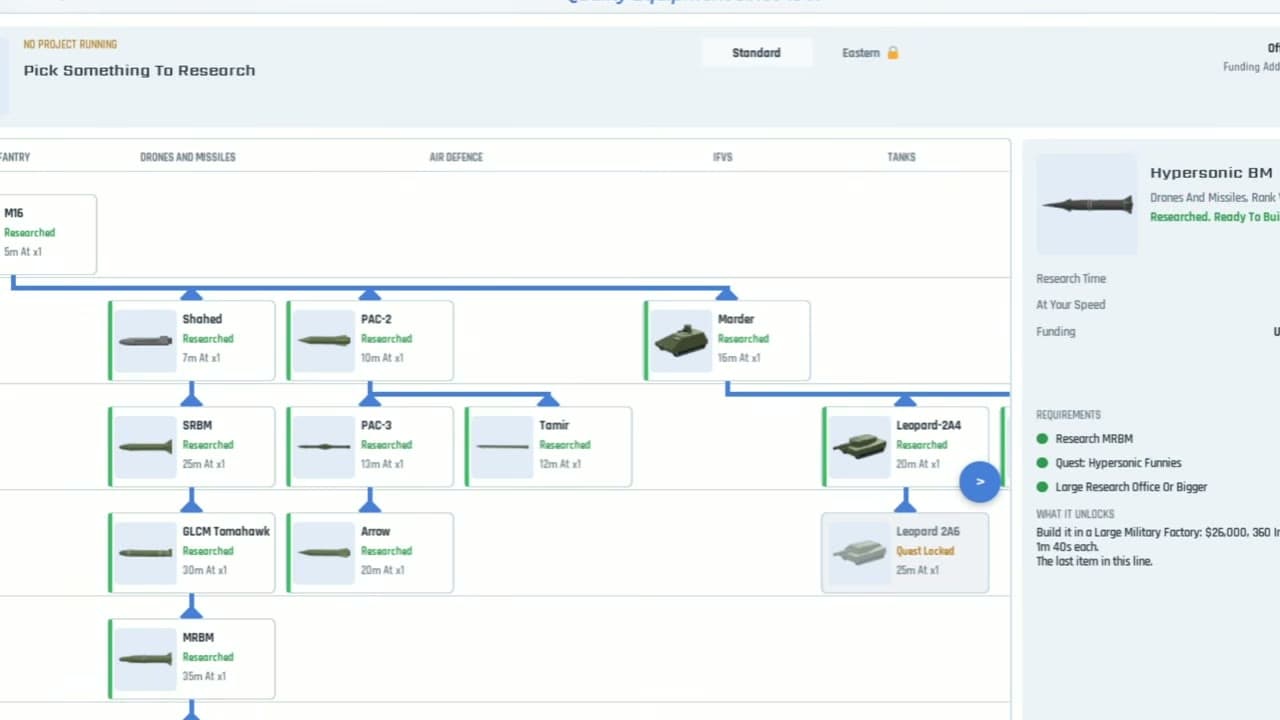
- Read the requirements listed on the selected node. The inspected Hypersonic BM panel includes a research prerequisite, a quest and a research-office size. Confirm each condition separately. A tutorial’s spoken summary can omit a condition visible in the panel.
- Success check
- The missing requirement or reproducible failure is identified.
A diagnostic check based on the displayed beta interface; no guaranteed repair is claimed.
Read the supporting evidence →A missile does not fire or replenish
- Check first
- Available missile stock, launch state and current factory recipe.
- What to do
- Separate a launch problem from a stock problem. Inspect whether a missile is actually available, whether a launch has been ordered, and what the current factory panel shows. If stock is absent, read the displayed recipe and production state. If a projectile launches but never hits, interception is a separate possibility. No verified uranium-only fix is available in the inspected sources.
- Success check
- The missing requirement or reproducible failure is identified.
A diagnostic check based on the displayed beta interface; no guaranteed repair is claimed.
Read the supporting evidence →Make a useful beta bug report
- Check first
- The exact selected object, action and displayed error.
- What to do
- Record the server/session time, the selected building or unit, its tooltip, the action you attempted and what changed. Include a screenshot of the requirement panel and the relevant counters. Use the official experience’s current support/community links if available. Do not spend a second large stockpile to reproduce a problem when a small test already demonstrates it.
- Success check
- The missing requirement or reproducible failure is identified.
A diagnostic check based on the displayed beta interface; no guaranteed repair is claimed.
Read the supporting evidence →Quick answer
Check construction and services for housing, each prerequisite for research, and production state for missiles. If the interface is inconsistent, record the exact state before reporting a beta bug.
§Housing is built but population is unchanged#
Start with construction completion. Next, read the selected building’s road, water and energy needs. The inspected apartment tooltips provide those conditions. Compare population before and after completion; the capacity value in a blueprint is only the stated capacity for that building.
§A missile node remains locked#
Read the requirements listed on the selected node. The inspected Hypersonic BM panel includes a research prerequisite, a quest and a research-office size. Confirm each condition separately. A tutorial’s spoken summary can omit a condition visible in the panel.
§A missile does not fire or replenish#
Separate a launch problem from a stock problem. Inspect whether a missile is actually available, whether a launch has been ordered, and what the current factory panel shows. If stock is absent, read the displayed recipe and production state. If a projectile launches but never hits, interception is a separate possibility. No verified uranium-only fix is available in the inspected sources.
§Make a useful beta bug report#
Record the server/session time, the selected building or unit, its tooltip, the action you attempted and what changed. Include a screenshot of the requirement panel and the relevant counters. Use the official experience’s current support/community links if available. Do not spend a second large stockpile to reproduce a problem when a small test already demonstrates it.
Scope and sources
Official description checked 11 October 2026. Recorded gameplay may differ from the current beta.
- The game is in beta. Requirements and menus may change.
- Gameplay advice reflects the inspected recordings; use the requirements shown in your current session.