Beta guide
Build and Conquer Beginner Guide
Your first goal is a country you can keep running. The inspected starter tutorial focuses on housing and civilian buildings before spending heavily on attacks.
Quick answer
Open the civilian building menu, inspect a housing blueprint, satisfy its road and service requirements, and let it finish. Track population and available workers before expanding your military.
Follow the checks
Adapt the shown process to the requirements in your current game.
Read the blueprint before placing it
Open Civilian, then Housing, and inspect an available blueprint.
- Success check
- You can identify its benefits, needs and placement conditions.
- If it remains unclear
- If it is locked, inspect its city-level requirement and choose an available blueprint.
Read the supporting evidence
§Read the blueprint before placing it#
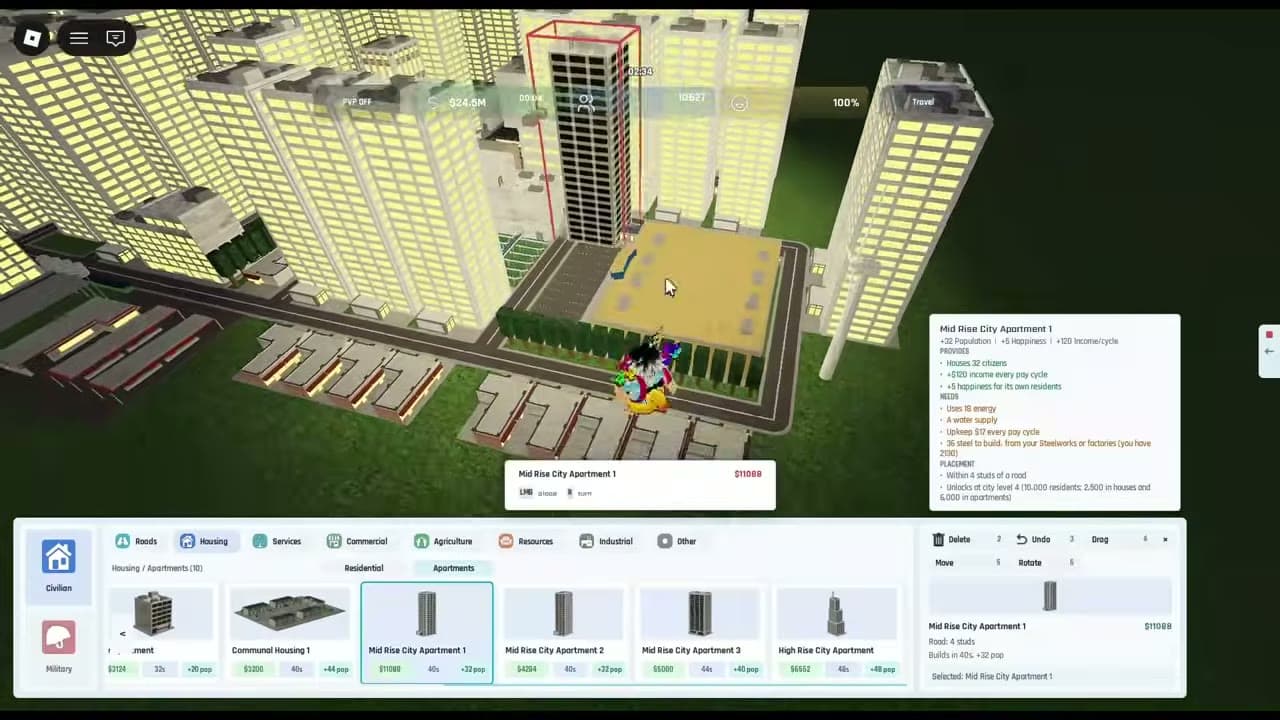
The starter recording shows a Civilian menu with Roads, Housing, Services, Commercial, Agriculture, Resources and Industrial tabs. In Housing, apartment tooltips list what a building provides, what it consumes and where it can be placed. Inspect those requirements before buying a block of buildings.
Start with one supported housing block
Place one housing building where its displayed road and service conditions are met.
- Success check
- Construction completes and the building is supported by the services it requires.
- If it remains unclear
- Check the blueprint tooltip and existing services before adding more copies.
Read the supporting evidence
§Start with one supported housing block#
Choose an available housing blueprint and place it where its displayed road condition is met. The inspected apartment tooltip also asks for energy and water. Let construction finish before judging whether it is contributing population. A building preview or an unfinished tower gives you an incomplete picture.
Watch population, workers and your next pay
Compare the top-bar counters after construction and the next pay cycle.
- Success check
- You can see whether population, free workers and money support another expansion.
- If it remains unclear
- Pause purchases and inspect upkeep or missing inputs if a counter moves in the wrong direction.
Read the supporting evidence
§Watch population, workers and your next pay#
The starter recording shows a top bar for money, Next Pay, population, free workers and happiness. Use those values to judge expansion. Add a small amount of housing, wait for completion and compare the result before repeating the same purchase. Save enough money to meet upkeep and your next building needs.
Prepare defense before committing to an attack
Inspect available defenses and research, then keep a reserve before attacking.
- Success check
- Your current unlocks and replacement costs are clear before you commit stock.
- If it remains unclear
- Build the civilian economy first if you cannot afford the shown military requirements.
Read the supporting evidence
§Prepare defense before committing to an attack#
Fundo recommends stockpiling drones and prioritizing defense when military becomes available. Treat that as a conservative starting strategy: preserve a reserve, inspect research locks, and protect your civilian investment before spending it on a long attack. The official game description confirms alliances, city defense and mainland conflict.
More to know
1 sections§What about the Level 2 requirement?#
At the start of the 7 October recording, the presenter says Level 2 needs 250 population. This is a dated spoken claim, and the footage begins in an advanced city. Check your current city-level panel for the actual unlock condition before aiming for that number.
Questions and answers
Should I attack as soon as I can produce soldiers?
The starter presenter recommends building up the city and defenses first. Inspect the resource cost and your reserves before choosing to attack.
Do I need to copy the exact city in the video?
No. The footage shows an established city. Use its building inspection process and adapt the layout to your available plot and unlocks.
Scope and sources
Official description checked 11 October 2026. Recorded gameplay may differ from the current beta.
- The game is in beta. Requirements and menus may change.
- Gameplay advice reflects the inspected recordings; use the requirements shown in your current session.